
 Buy
Buy Docs
Docs EULA
EULA Help
HelpDocumentation

Getting Started
About
Intelephense is a high performance, cross platform, cross editor PHP language server adhering to the Language Server Protocol (LSP).
When paired with an LSP capable editor it provides an essential set of code tools, making for a productive and rich PHP coding experience.
The Intelephense server is proprietary software released to end users under a "freemium" model. Many of the features are provided free of charge. Access to premium features can be obtained by purchasing a licence key.
Installation
Visual Studio Code
Visual Studio Code users should install the Intelephense extension from within the extensions view or download it from the VSCode marketplace.
The built-in VSCode PHP Language Features extension can cause excessive completion suggestions that are out of context and is best disabled. Go to the Extensions UI and search for PHP Language Features to disable it. Alternatively, you can disable parts of it via it's configuration settings. Other third party extensions that provide similar functionality to Intelephense may also need to be disabled for best results.
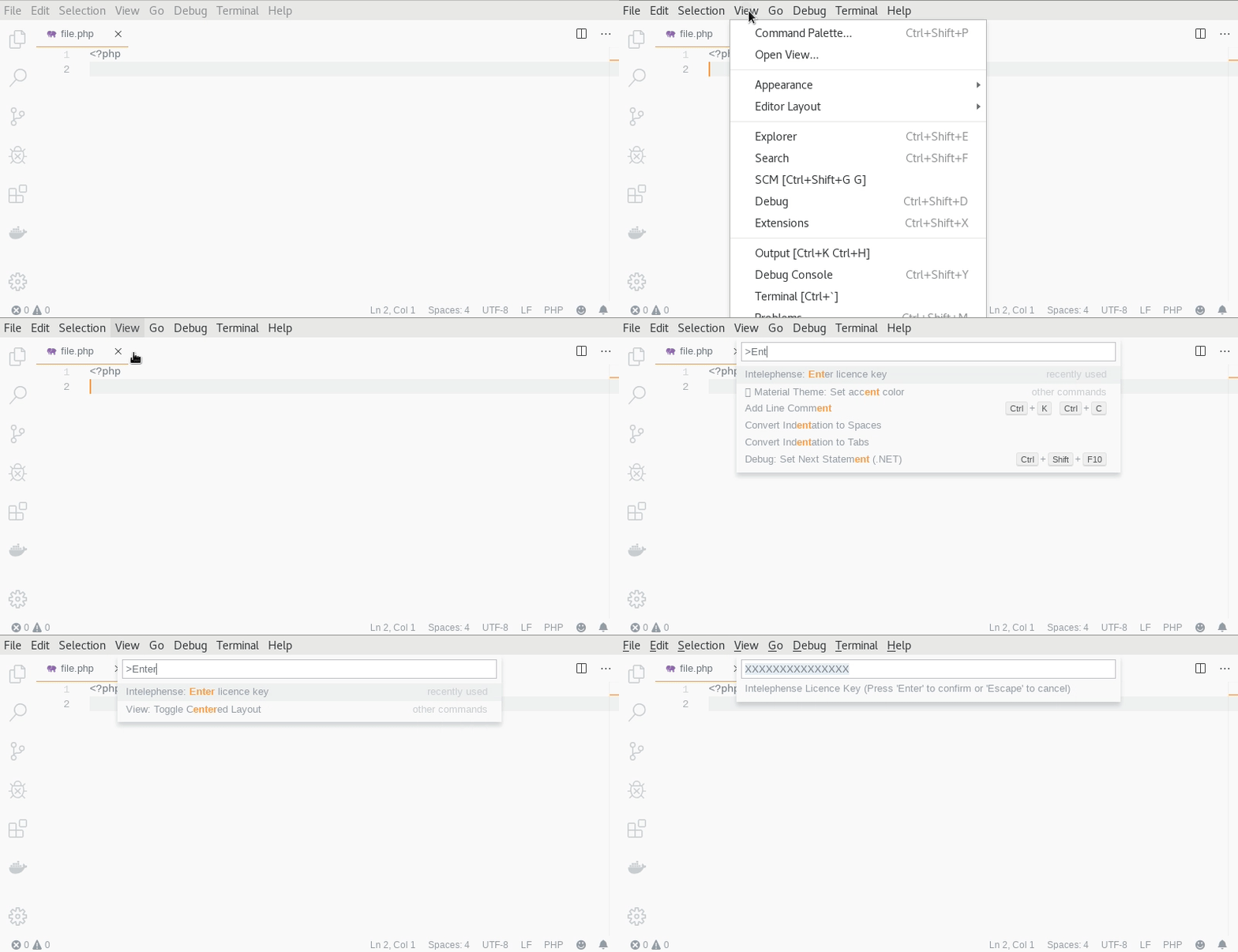
Optionally purchase and enter your licence key by opening the command palette (Ctrl+Shift+P) and searching for Enter licence key.
Other Editors
Intelephense requires a Node.js runtime environment. It is recommended that you use a current LTS version of Node.js. To install Intelephense server you can use npm.
npm i intelephense -gIntelephense needs an LSP compliant client to communicate with and integrate features into the editor. A list of editors and clients that support the LSP can be found here. Please follow the setup guide of the relevant tool. The information below may help in configuring the client.
To start the intelephense server:
intelephense {transport}
Where {transport} is one of:
--node-ipc--stdio--socket={number}--pipe={string}
If your LSP client exposes initializationOptions, then the following values are accepted:
interface InitialisationOptions {
    // Optional absolute path to storage directory for workspace specific data.
    storagePath?: string;

    // Optional absolute path to a global storage directory for global data.
    globalStoragePath?: string;

    //Optional licence key or absolute path to a text file containing the licence key.
    licenceKey?: string;

    //Optional flag to clear server state.
    //State can also be cleared by deleting {storagePath}/intelephense
    clearCache?: boolean;
}
When initializationOptions properties are not provided by the client, the following defaults are used:
| OS | Property | Path | Fallback |
|---|---|---|---|
| *nix | storagePath |
$XDG_CONFIG_HOME/intelephense/workspace/ |
$HOME/.config/intelephense/workspace/ |
| *nix | globalStoragePath |
$XDG_CONFIG_HOME/intelephense/global/ |
$HOME/.config/intelephense/global/ |
| *nix | licenceKey |
{globalStoragePath}/licence.txt |
{globalStoragePath}/license.txt |
| Windows | storagePath |
%AppData%/intelephense/workspace/ |
%UserProfile%/intelephense/workspace/ |
| Windows | globalStoragePath |
%AppData%/intelephense/global/ |
%UserProfile%/intelephense/global/ |
| Windows | licenceKey |
{globalStoragePath}/licence.txt |
{globalStoragePath}/license.txt |
If your LSP client does not expose initializationOptions then a licence key can
be provided by placing (only) the key in a text file at the default licenceKey path listed above.
Configuration
Please see the VSCode client package.json
configuration property for a full list of configuration options and associated JSON schema.
Note that the configuration keys are given in dot notation.
As an example, the equivalent JSON object for intelephense.files.exclude would be {"intelephense": {"files": {"exclude": []}}}.
Intelephense attempts to provide reasonable defaults for all settings. Some of the more important settings to consider when getting started include:
intelephense.files.associations- File globs that identify PHP files. Defaults to standard PHP file extensions e.g.*.php.intelephense.files.maxSize- Maximum file size in bytes to index and provide analysis for. Defaults to1000000(1MB).intelephense.environment.phpVersion- PHP version to use for analysis. Defaults to the most recent stable PHP version.intelephense.stubs- List of stubs to include. Defaults to core symbols and extensions that are bundled with PHP. If you are getting undefined symbols for built-in or PECL extensions, you may need to modify this list.
In VSCode, the settings UI can be used to modify the configuration values.
For other LSP clients, please see the client documentation on how to modify these values.
Intelephense supports the LSP
workspace/didChangeConfiguration and
workspace/configuration
methods as a way of supplying configuration values to the server.
If neither of the methods above are supported by the client, then configuration values can be supplied via an intelephense.config.json file placed in the workspace folder.
The JSON schema for this file is the same as the one used for the VSCode client. The top level intelephense property is not required in this file.
For Intelephense to work effectively it must have access to the definitions of the symbols used in your code.
Opening a project folder (LSP InitializeParams rootUri or workspaceFolders) rather than individual files enables these symbols to be discovered by Intelephense via indexing the PHP files in the folder.
Large workspaces require more system resources.
Consider opening a smaller workspace or exclude unnecessary files via the intelephense.files.exclude setting to reduce resource usage.
If you need to include files from outside of the workspace folder, then add the paths to these files to the intelephense.environment.includePaths setting.
When configuring a multi-root workspace, Intelephense will presume that the folders in the workspace are separate projects
and will not provide cross folder symbols unless you link the dependency between the projects via the intelephense.environment.includePaths setting.
Depending on the framework or library you use, you may find you need additional configuration to provide method declarations or override existing ones. Please see the Frameworks and Libraries section in the appendix for more information on this.
Type System
Providing type information in your PHP code will result in a better experience when using Intelephense. Type information can be provided via coded type declarations or PHPDoc type annotations. Where both have been provided, PHPDoc type annotations are given precedence as they can provide more detailed type information.
<?php

/**
 * @param string $s  <- A phpdoc parameter type annotation for $s
 * @return string[] <- A phpdoc return type annotation specifying the array element type
 **/
function foo(string $s): array {} // <- type declarations for $s (string) and function return (array)
Intelephense will also compute inferred types when a declared or documented type is not found or during control flow analysis.
When a type is inferred it may be reduced to it's minimal representation.
For example, MyClass|object would become object because MyClass is a sub-type of object.
Intelephense provides limited support for PHPStorm metadata as a way of overriding or supplementing type information. It is recommended to use PHPDoc type annotations instead of PHPStorm metadata where possible as they are more widely supported across different tools. Support for PHPStorm metadata may be removed in future releases. Please see the PHPDoc Instead of PHPStorm Metadata/Attributes section in the appendix for more information.
Type Narrowing
Intelephense performs type narrowing of variables during control flow analysis.
Type narrowing expressions include built-in type assertions such as is_string, custom type assertions annotated with @assert,
instanceof, and equality expressions.
The example below demonstrates type narrowing.
<?php

class Foo {}

function example(string|array|Foo|null $input): void
{
    if (!$input) {
        // $input is narrowed to string|array|null in this block
        // empty strings, empty arrays and null are all falsey
    } else {
        // $input is narrowed to string|array|Foo in this block

        if ($input instanceof Foo) {
            // $input is narrowed to Foo in this block
        } else if (is_string($input)) {
            // $input is narrowed to string in this block
        } else {
            // $input is narrowed to array in this block
        }
    }
}
Type Evolving
Type evolving is the change in a variable's type after an assignment expression. Simple variables and parameters always change to the type of the assigned expression regardless of initial assignments, type declarations or annotations.
Properties with no type declaration or annotation will also change to the type of the assigned expression. Otherwise they will only widen or narrow according to the bounds of the initial type they have been declared or annotated with.
Intelephense will type evolve array types when mutated only if they are declared with an empty array initialiser. Otherwise they are considered to retain their initial declared, annotated or inferred type. The example below demonstrates type evolving.
<?php

function example(int $a): void
{
    $a = "string"; // $a is now type string

    $b = []; // $b is type array and flagged as evolving

    $b[] = "string"; // $b is now type string[]

    $b[] = 9; //$b is now (string|int)[]

    $c = [1, 2]; // $c is type int[] and NOT flagged as evolving

    $c[] = "string"; // $c is still type int[]
}
Supported Types
In the list of supported types below, some can only be used in PHPDoc as documented types. Please see the PHP type system documentation if you are unfamiliar with the standard PHP types. PHPDoc only, or internal types, are flagged with an asterisk.
Additional types used in other static analysis engines that are not listed here are not fully supported. Intelephense attempts to fallback to an appropriate alternative in this situation.
Top Type
mixed
The super-type of all types.
Any other type can be assigned to a type constraint of mixed.
If intelephense cannot determine a more specific type for a symbol or expression then this is the type it is given.
Because of this, Intelephense also allows mixed to be assigned to any other type constraint as well,
effectively turning off type checking for that instance.
To switch off this behaviour you can set both intelephense.diagnostics.relaxedTypeCheck and
intelephense.diagnostics.noMixedTypeCheck to false.
Bottom Type
never
The sub-type of all types. This type can be assigned to any other type constraint. It is used to represent an impossibility in the code and can be used as the return type of a function that exits or always throws an exception.
Scalar Types
Any of these types can be assigned to the other unless the declare(strict_types=1) directive is used in the file or intelephense.diagnostics.strictTypes is true.
intfloatboolstring
Unit Types
voidnulltruefalseunset* Intelephense uses this PHP keyword to represent the type of an undefined variable.
Literal Types
'myString'* String literals are encapsulated in quotes.9* An integer literal.
Object Types
object-
\MyNs\MyClassClasses, interfaces, traits, and enums can be fully qualified or not. If not fully qualified then the standard PHP name resolution rules apply to determine the fully qualified name. -
object{name: string, optional?: string}* Object shapes can be used to provide further information on dynamic object properties. This improves completion suggestions and type inference when accessing these properties. Optional properties can be declared by adding a?at the end of the name. staticself$this*
Array Types
array-
array<TKey, TValue>* Generic form for an array where the type arguments represent the array key and value types respectively. If only a single type argument is provided then it will be normalised toarray<string|int, TValue>. TValue[]* Represents a numeric indexed array where the element type isTValue.-
array{description: string, 'length (cm)': float, optional?: string, ...<int, string>}* Array shapes can be used to provide further information on array element keys and value types. This improves completion suggestions and type inference when accessing these elements. Keys with non alphanumeric characters need to be in quotes. Optional keys can be declared by adding a?at the end of the key. Unspecified extra elements can be declared by adding an element of form...<TKey, TValue>. Keys are optional and default to numerically indexed. For example a two element tuple would bearray{Type0, Type1}. A mix of keyed and unkeyed elements is not supported.
Callable Types
callableBase callable type that represents a callablestring, callablearrayor a class that implements__invoke.-
callable(TParamA $a, TParamB $b): TReturn* Callable type signatures can be defined to improve language intelligence. Parameter names are optional. The callable type should be wrapped in parentheses if it forms part of a union.Closurecan be used instead ofcallablefor a more specific type.
Alias Types
iterableAlias forTraversable|array.?ANullable type that is shorthand fornull|A. Cannot be used as part of a union or intersection type.
Union Types
A|B|C
A type which may have multiple atomic type representations.
For example, a type constraint of A|B can be assigned type A or B.
Intersection Types
A&B&C
A composite type which consists of multiple atomic types.
For example, a type of A&B can be assigned to type A and to type B.
DNF Types
A|B|(C&D&E)
When combining union and intersection types, only a single level of nesting is permitted. The union must be the top level.
Generic Types
MyType<TypeArg1, TypeArg2>*
A generic type can be declared using one or many @template PHPDoc annotations above the target class, interface, or trait.
Type arguments can then be supplied in the same order as the @template declarations.
The following built-in types are templated:
iterable<TKey, TValue>Traversable<TKey, TValue>array<TKey, TValue>Iterator<TKey, TValue>IteratorAggregate<TKey, TValue>ArrayAccess<TKey, TValue>WeakReference<TObject>WeakMap<TKey, TValue>Fiber<TStart, TResume, TReturn, TSuspend>DatePeriod<TDate, TEnd>ReflectionAttribute<TObject>ReflectionClass<TObject>Generator<TKey, TYield, TSend, TReturn>ArrayObject<TKey, TValue>SplDoublyLinkedList<TValue>SplQueue<TValue>SplStack<TValue>SplHeap<TValue>SplMinHeap<TValue>SplMaxHeap<TValue>SplPriorityQueue<TPriority, TValue>SplFixedArray<TValue>SplObjectStorage<TObject, TValue>
Conditional Return Type
(TSubject is TCompare ? TTrue : TFalse)*
Sometimes the return type of a function may depend on the type of a parameter.
A conditional type can be used without templates too by using the parameter name.
For example, ($myParam is string ? string : null).
Conditional types must be wrapped in parentheses. Conditional types may also be nested.
Array Key Type
key-of<TArray>*
This type will resolve to a union of the keys of an array shape.
Array Value Type
value-of<TArray>*
This type will resolve to a union of the values of an array shape.
Index Access Type
TArray[TKey]*
This type will resolve to the type of the value at index TKey in TArray.
It is particularly useful in conjunction with key-of<TArray>
and shape types for mapping the return type when accessing container items with arbitrary strings. For example:
<?php

class MyContainerItem {}

class MyContainer
{
    /**
     * @template TMap of array{item: MyContainerItem, other: object}
     * @template TKey of key-of<TMap>
     * @param TKey $name
     * @return TMap[TKey]
     */
    function get($name): mixed {}
}

$container = new MyContainer();
$item = $container->get('item'); //$item is MyContainerItem
Miscellaneous Types
resource*class-string<T>* Astringwhere the value is the name of classT.
PHPDoc Annotations
Intelephense supports standard PHPDoc annotations as well as non-standard annotations which have been popularised by other static analysis tools such as Psalm and PHPStan. The below list describes the non-standard annotations that Intelephense supports. For further information on standard PHPDoc annotations, please see the PHP_FIG and phpDocumentor references.
Some libraries or projects that have adopted static analysis tools such as Psalm or PHPStan may prefix some annotations with the tool name to avoid conflicts with other tools.
To make Intelephense prefer these prefixed annotations over the un-prefixed ones,
you can set the intelephense.compatibility.preferPsalmPhpstanPrefixedAnnotations setting to true.
Intelephense does not aim to support all types and features of these tools but will attempt to fallback to appropriate alternatives where possible.
@template
/** @template TemplateName of OptionalTypeConstraint = OptionalDefaultType */This annotation is used to declare a type argument of a generic type, function or method. The order that the template types appear is the same order in which the type arguments must be supplied in a generic type expression. The template type can be optionally constrained to a specific type and given an optional default type to be used when no type argument is supplied.
@template-extends
/** @template-extends ParentType<TypeArg1, TypeArg2> */
This annotation is used to declare the type arguments supplied to a generic parent type.
It can be used on classes and interfaces when extending a parent class or interface.
The alias @extends is also supported.
@template-implements
/** @template-implements InterfaceType<TypeArg1, TypeArg2> */
This annotation is used to declare the type arguments supplied to a generic interface.
It can be used on classes and enums when implementing an interface.
The alias @implements is also supported.
@template-use
/** @template-use TraitType<TypeArg1, TypeArg2> */
This annotation is used to declare the type arguments supplied to a generic trait.
It can be used on classes, traits and enums when using a trait.
The alias @use is also supported.
@param-closure-this
/** @param-closure-this Type $parameter */
This annotation is used to declare the type of the $this variable inside a closure
that is passed as a parameter to a function or method.
An example of a standard PHP method that benefits internally from this annotation is Closure::bind().
@param-out
/** @param-out Type &$parameter */This annotation is used to declare the out type of a by-reference parameter. Intelephense will not modify the type of a by-reference parameter unless this annotation is used.
@assert
/** @assert Type $parameter */This annotation is used to declare a function or method that asserts that an argument is of the specified type. Intelephense will narrow the type of the passed variable to the asserted type after the function or method call. It is presumed that the function or method has no false path and that it will throw an exception or exit if the assertion fails.
@assert-if-true @assert-if-false
/** @assert-if-true Type $parameter */Similar to above but for functions or methods that have a boolean return type. This asserts that the passed variable is of the specified type on the true or false code path respectively at the call location.
@mixin
/** @mixin ClassName */
This annotation is used to declare that the members of the specified class are mixed in to the current class
via __call, __callStatic, __get or __set magic methods.
Only available with a licence in Intelephense Premium.
@disregard
/** @disregard PXXXX */
This annotation is used to suppress a specific diagnostic at the statement following the annotation.
For example, @disregard P1010 would suppress the diagnostic with code P1010.
This can be useful when you have a specific case where you want to allow something that Intelephense would normally report as an issue.
@type-alias
/** @type-alias TypeName = Type */
This annotation is used to declare a type alias.
A type alias allows you to create a new name for an existing type, which can be useful for improving code readability or for creating more meaningful type names.
It functions the same as @phpstan-type and @psalm-type annotations which are also recognised.
Intelephense type aliases follow normal PHP namespace rules.
@import-type
/** @import-type TypeName as OptionalAlias */
This annotation is used to import a type alias that has been declared in another file.
It functions similarly to @phpstan-import-type and @psalm-import-type and both these annotations may also be used.
However, type aliases are not bound to classes in Intelephense and as such the from ClassName specifier is unnecessary but still supported.
Type aliases in Intelephense follow normal PHP namespace rules.
Features
Intelephense provides a variety of features to enhance the development experience when working with PHP code. Many of these features are provided for free while others require a Premium licence to access. All images and videos in this section are taken from the VS Code client. The features are available to all LSP clients that support the relevant LSP methods. Keybindings listed for each feature are the defaults for the VS Code client.
Free Features
The following features are available to all users of Intelephense. A licence is not necessary.
Workspace Symbols
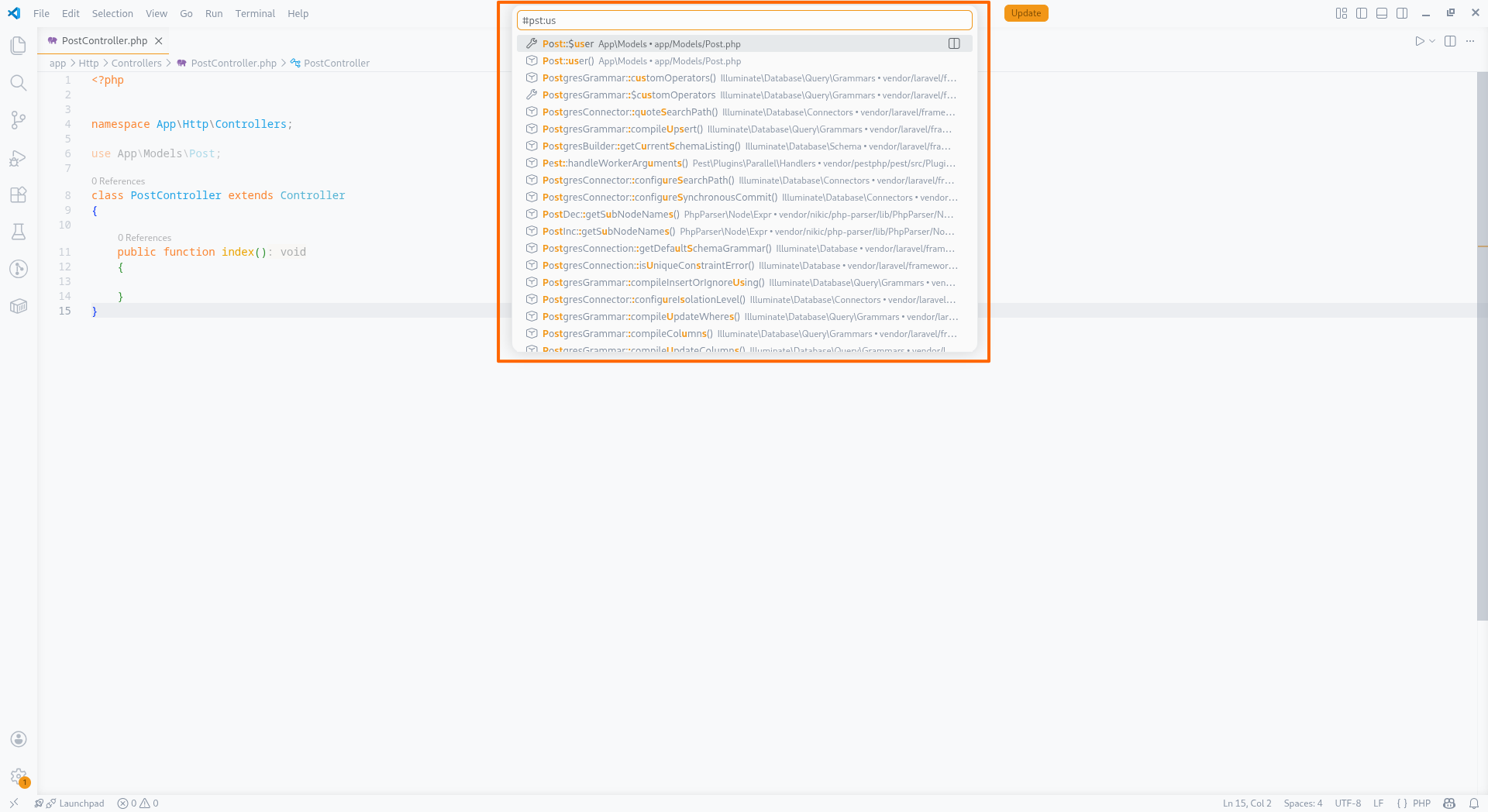
This feature allows you to search for symbols in your workspace and navigate to their definitions.
It is particularly useful for finding and navigating to symbols that are not directly referenced in the current file.
When the query contains alphanumeric characters only, the search is performed on the unqualified name of the symbol.
You can narrow your search to a specific symbol by using a query containing characters found in the Fully Qualified Structural Element Name (FQSEN) of the symbol.
For example, a query of m\pt:u( would find the method with FQSEN App\Models\Post::user().
Unfortunately, VS Code has a current issue where it will discard results if the query contains a backslash. This means that you cannot search on the namespace part of a type.
Document Symbols
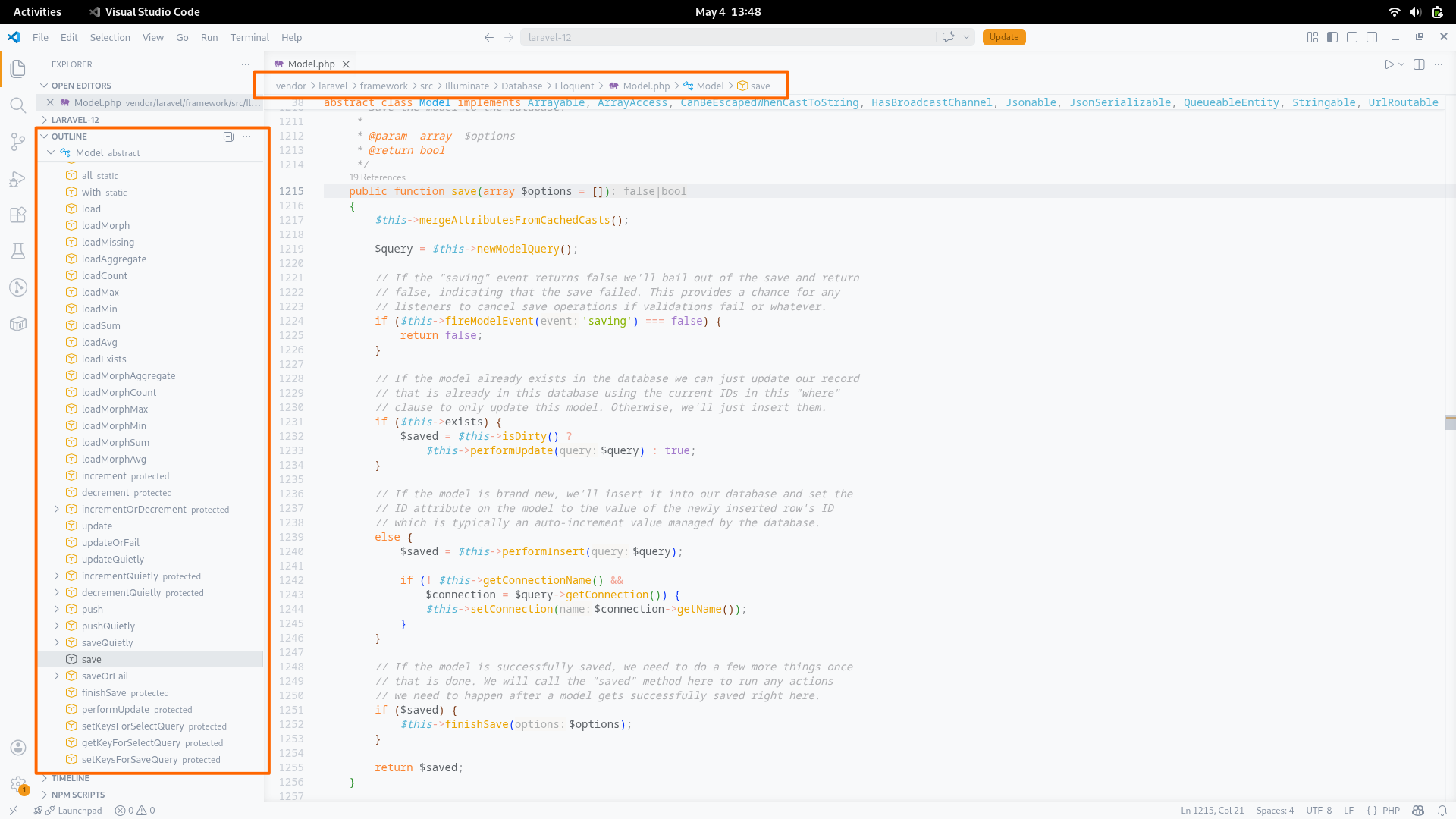
This feature lists all symbols in the current document, providing an overview of the structure of the file. A client can use this information to provide a document outline view, breadcrumb navigation, and a symbol search specific to the current file.
Go to Definition
This feature allows you to navigate to the definition of a symbol when invoked on a reference to that symbol in the current file.
Multiple definitions may sometimes be found for a symbol.
For example, invoking the feature on the type name in a new expression may find both the constructor method and the class declaration as definitions.
It is up to the client to decide how to present multiple definitions to the user.
For example a peek definitions window may open or the user may simply be navigated to the first definition in the list.
Hover
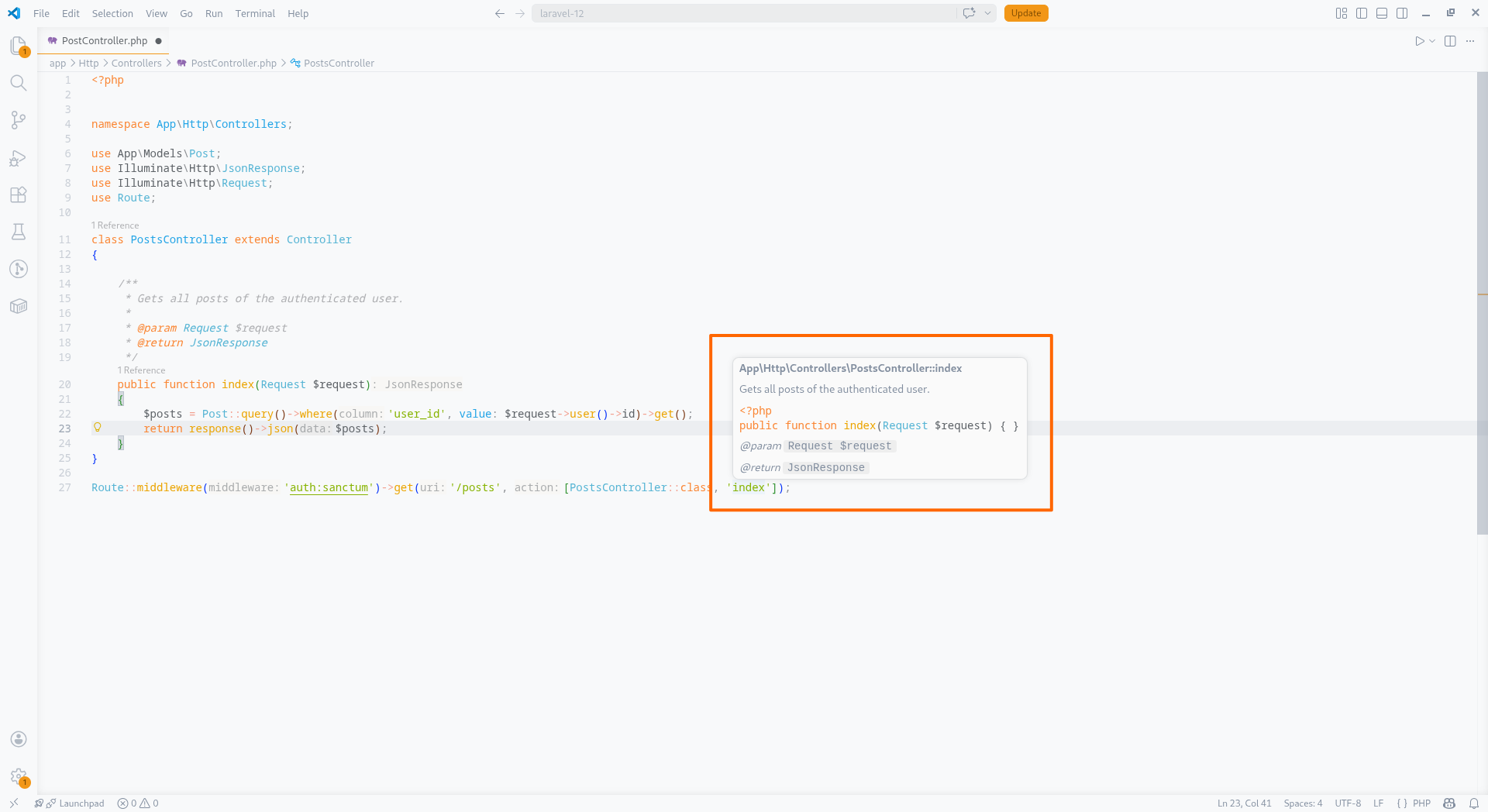
This feature provides information about a symbol when hovering over a reference to that symbol in the current file. The information provided can include the type of the symbol, it's signature if it is a function or method, and any associated documentation.
Highlight
This feature highlights all references to the symbol at the cursor position in the current file. This can be useful for quickly identifying all usages of a symbol in the current file. Read and write contexts will be identified if applicable and the client can choose to highlight them differently if desired.
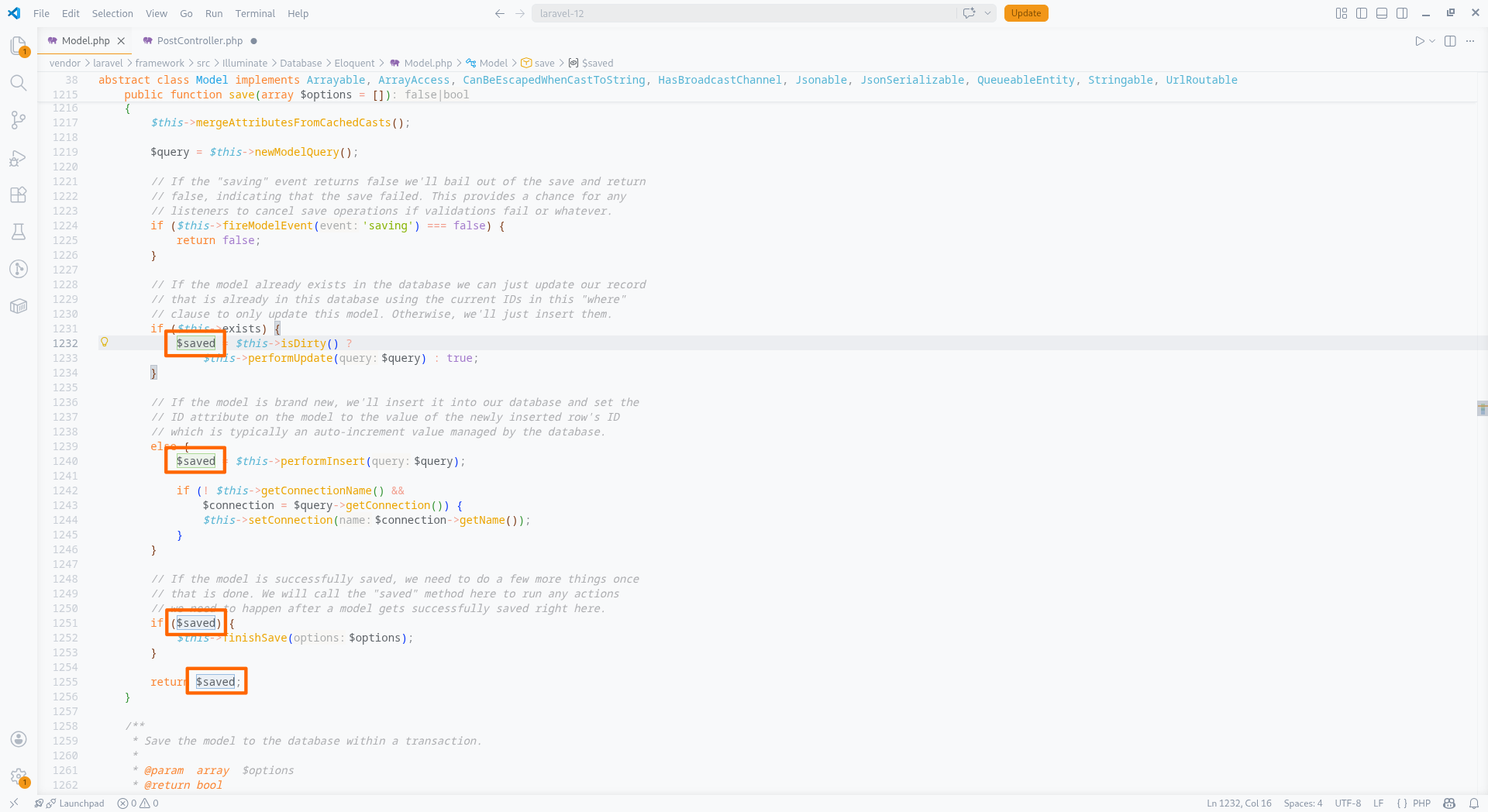
Code Completion
This feature provides a list of context appropriate completion suggestions for a symbol at the cursor position in the current file. The completions can include variables, functions, methods, classes, and other symbols. Where appropriate, additional edits are provided to automatically import a symbol.
In VS Code, when using Copilot, suggestions from Intelephense may not be shown automatically by default.
To ensure that Intelephense suggestions are always shown, you can set the
editor.quickSuggestions
setting to an object that specifies the contexts in which to show suggestions. For example, {"other": "on", "comments":"on", "strings": "on"}.
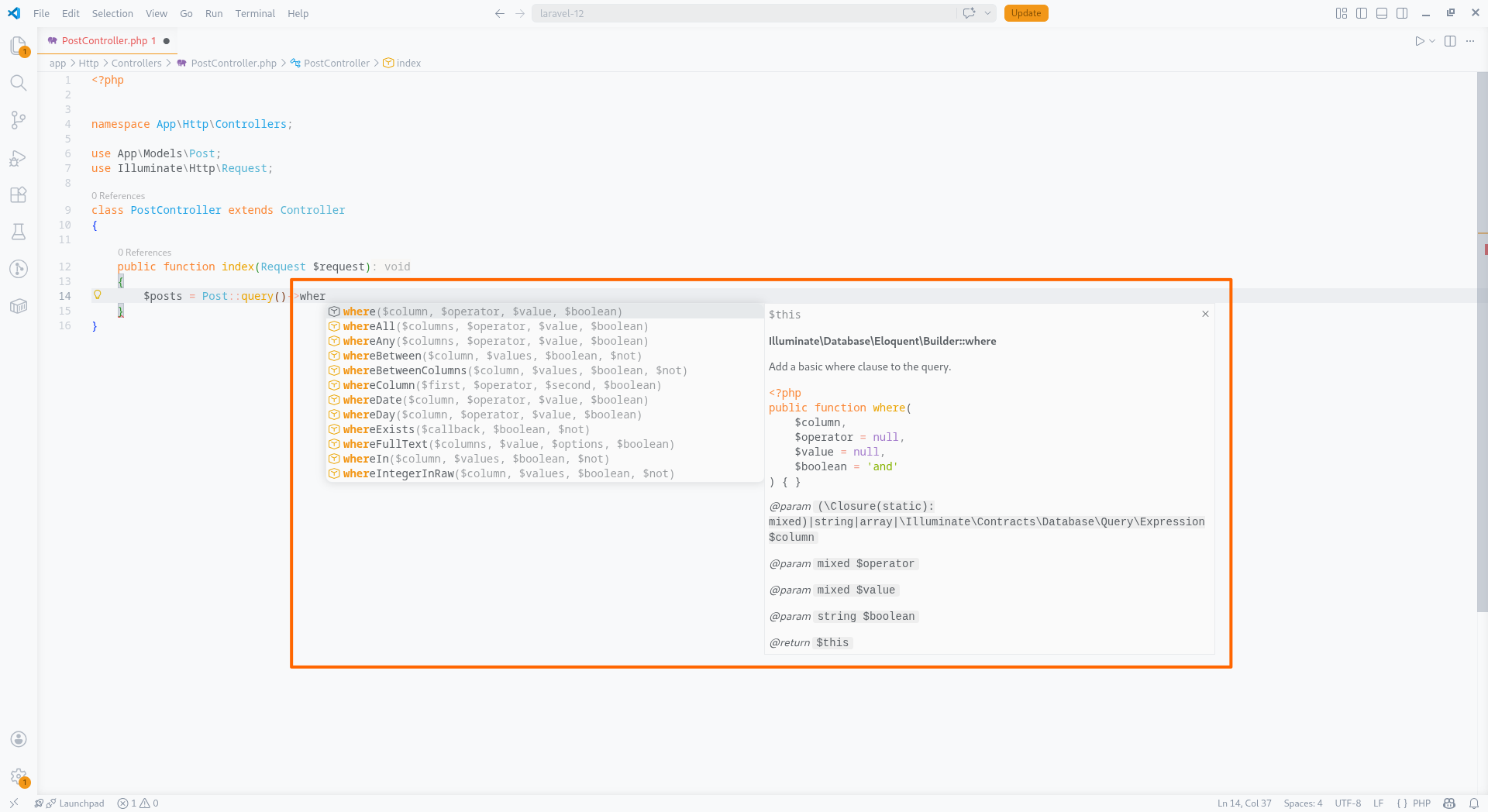
Signature Help
This feature provides information about the signature of a function or method when the cursor is within the argument list of a function or method call. The information provided can include the types of the parameters, the return type, and any associated documentation.
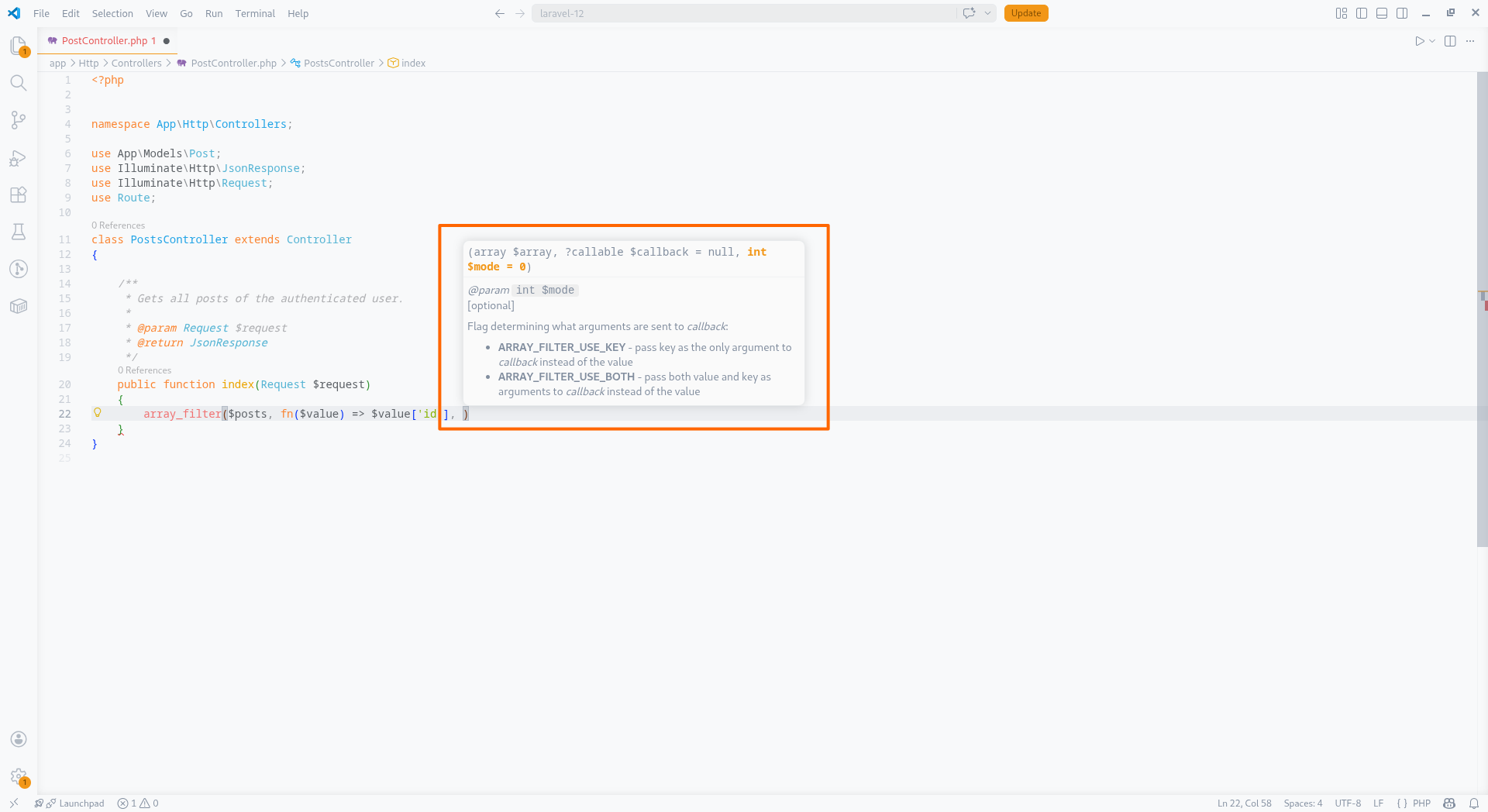
Find All References
This feature provides a list of all references to a symbol in the current file or workspace. The references can include variables, functions, methods, classes, and other symbols. When there is a hierarchy of types, references to a type member will be determined relative to the initial base members.
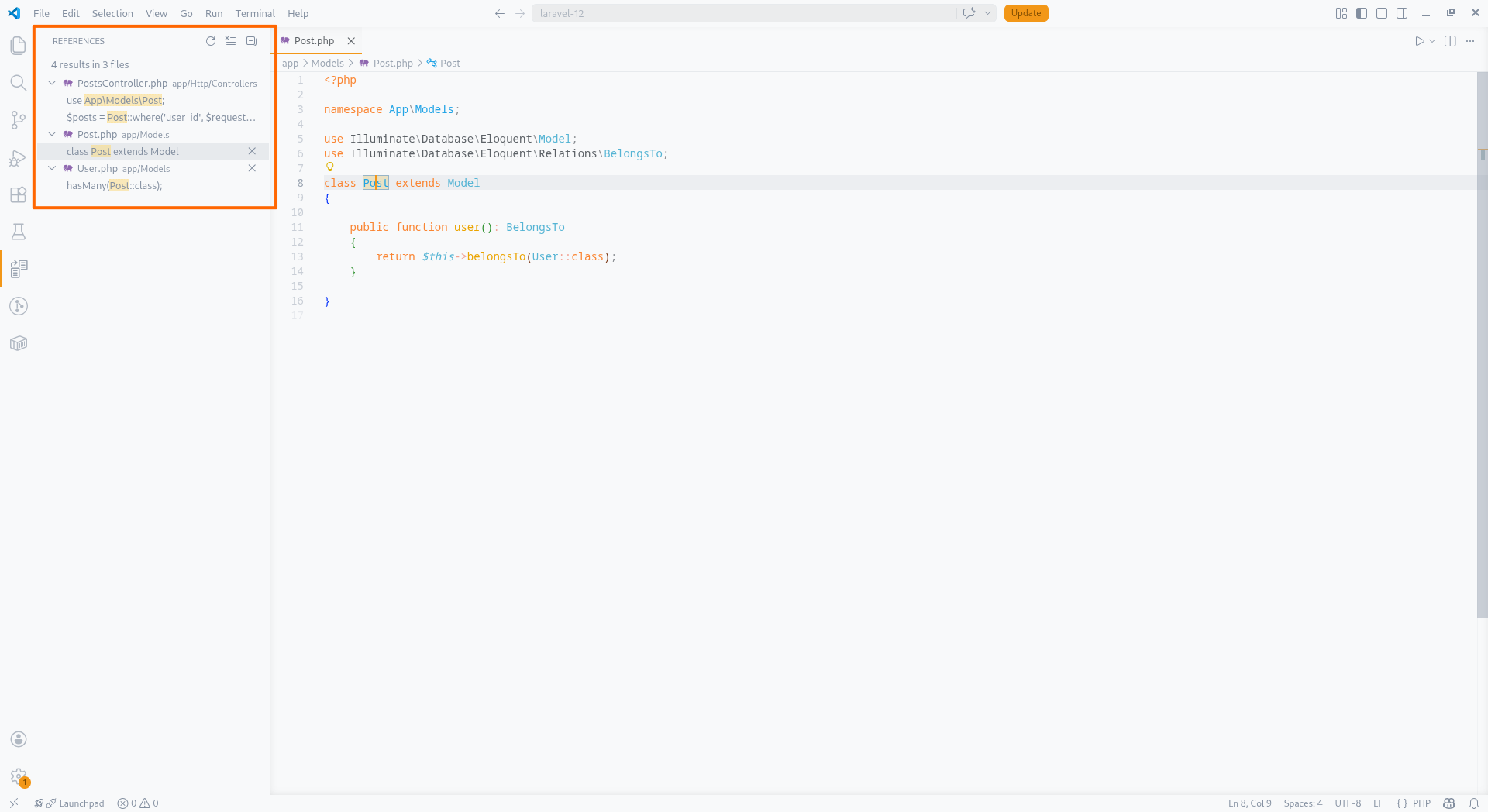
Formatting
This feature provides formatting of a whole document or a selected range within a document. The Intelephense formatter is opinionated and aims to comply with PHP-FIG coding standards. Limited configuration options are available to allow some customisation of brace style.
Diagnostics
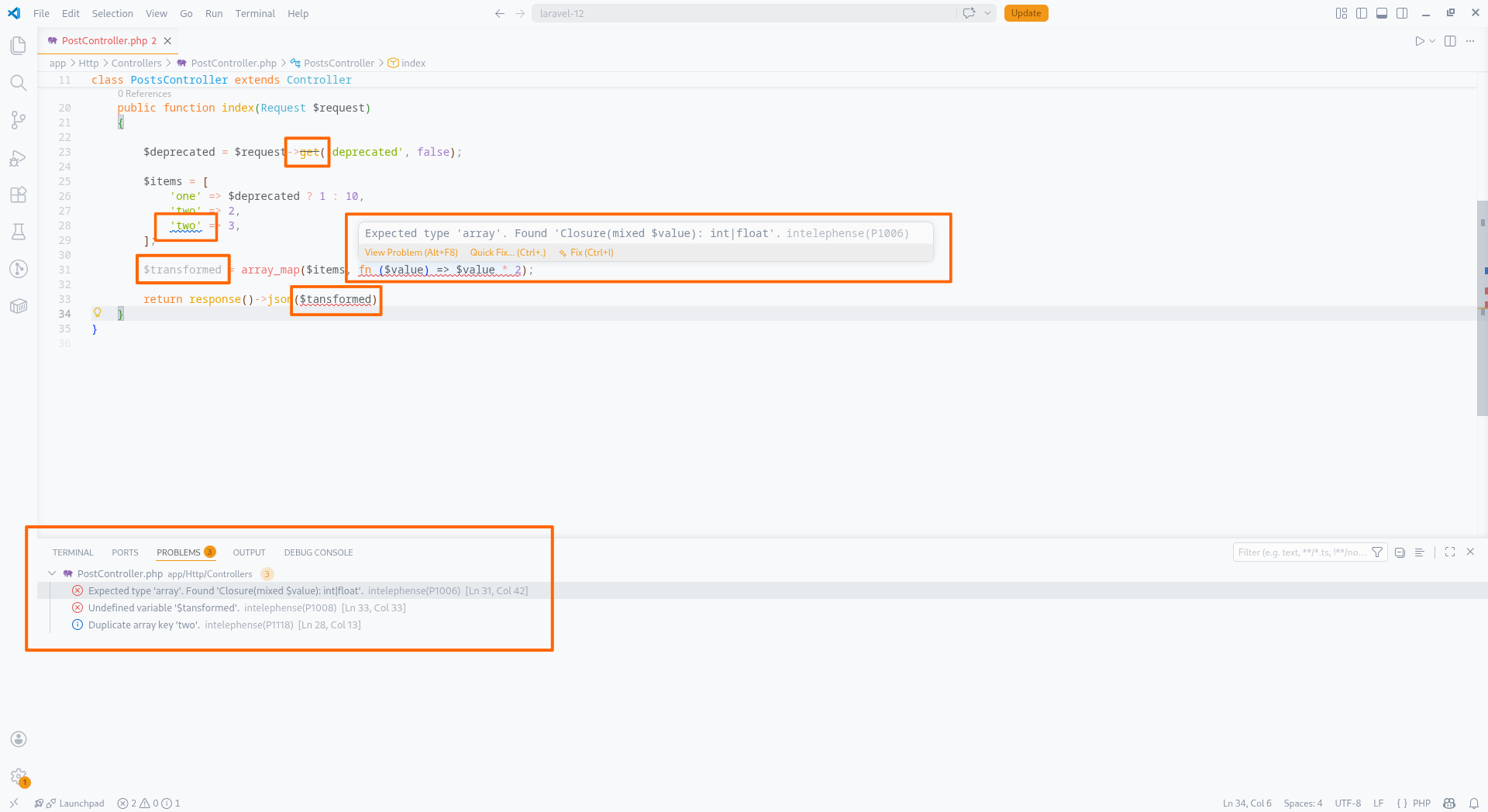
This feature provides diagnostics for the currently opened files. Diagnostics include syntax errors, type errors, language constraints and other issues detected by Intelephense. Intelephense aims to provide rapid diagnostics that are aligned with the PHP engine where possible.
Performance and minimising false positives are prioritised over exhaustiveness. It should not be used as a substitute for testing your code. The diagnostics emitted can be configured in the settings to be more or less thorough or ignored altogether depending on your preferences and the codebase you are working with.
If you need fine grain control over which diagnostics are shown, try the intelephense.diagnostics.exclude setting.
This setting allows you to map a file glob to an array of diagnostic codes to exclude from diagnostics.
A full list of diagnostic codes can be found in the
vscode-intelephense repository.
By default, Intelephense performs type checking on declared types only and in a relaxed mode in order to reduce false positives. In a hierarchy of types, a sub-type satisfies a super-type constraint. Intelephense also permits the reverse. That is, a super-type or wider type can be assigned to a sub-type or narrower type constraint. This default behaviour has been chosen due to inherent limitations in static analysis, the lack of syntax in PHP or PHPDoc to enable a developer to inline cast an expression or variable, and due to the variable quality of type information in some codebases.
To make type checks more thorough, there are several settings available.
intelephense.diagnostics.relaxedTypeCheckcontrols whether to emit diagnostics when a super-type (excludingmixed) is assigned to a sub-type constraint.intelephense.diagnostics.noMixedTypeCheckcontrols whether to emit diagnostics whenmixedis assigned to narrower type constraints.intelephense.diagnostics.strictTypesis a global equivalent to addingdeclare(strict_types=1);to the top of each file.intelephense.diagnostics.typeCheckDocumentedTypescontrols whether documented types are included in type checking.
Inline Values
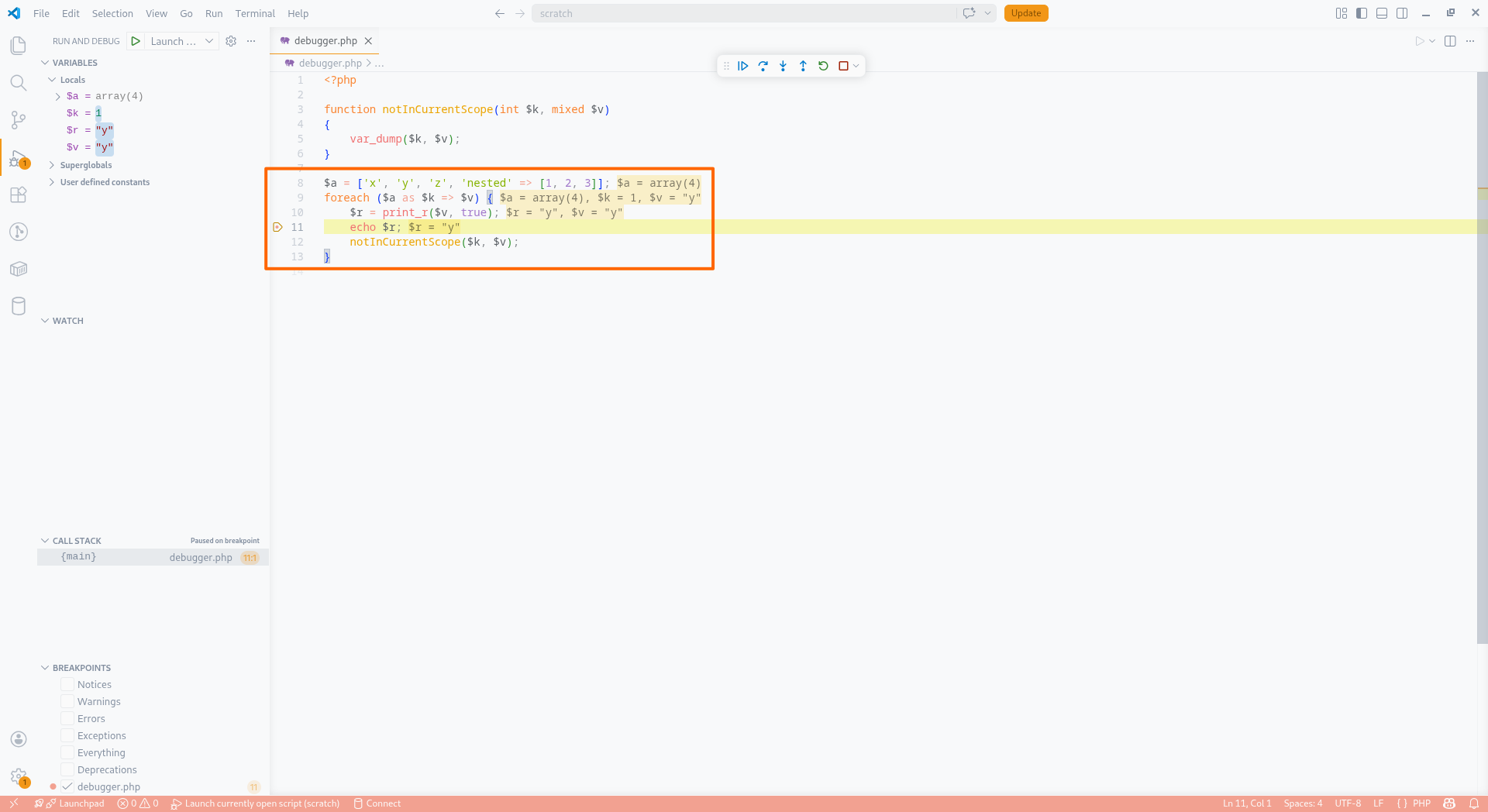
This feature provides ranges and text for variables in a file that may be relevant for a debugger to display inline values for during a debugging session. To see this feature in action in VS Code, install the official Xdebug extension.
Embedded Languages
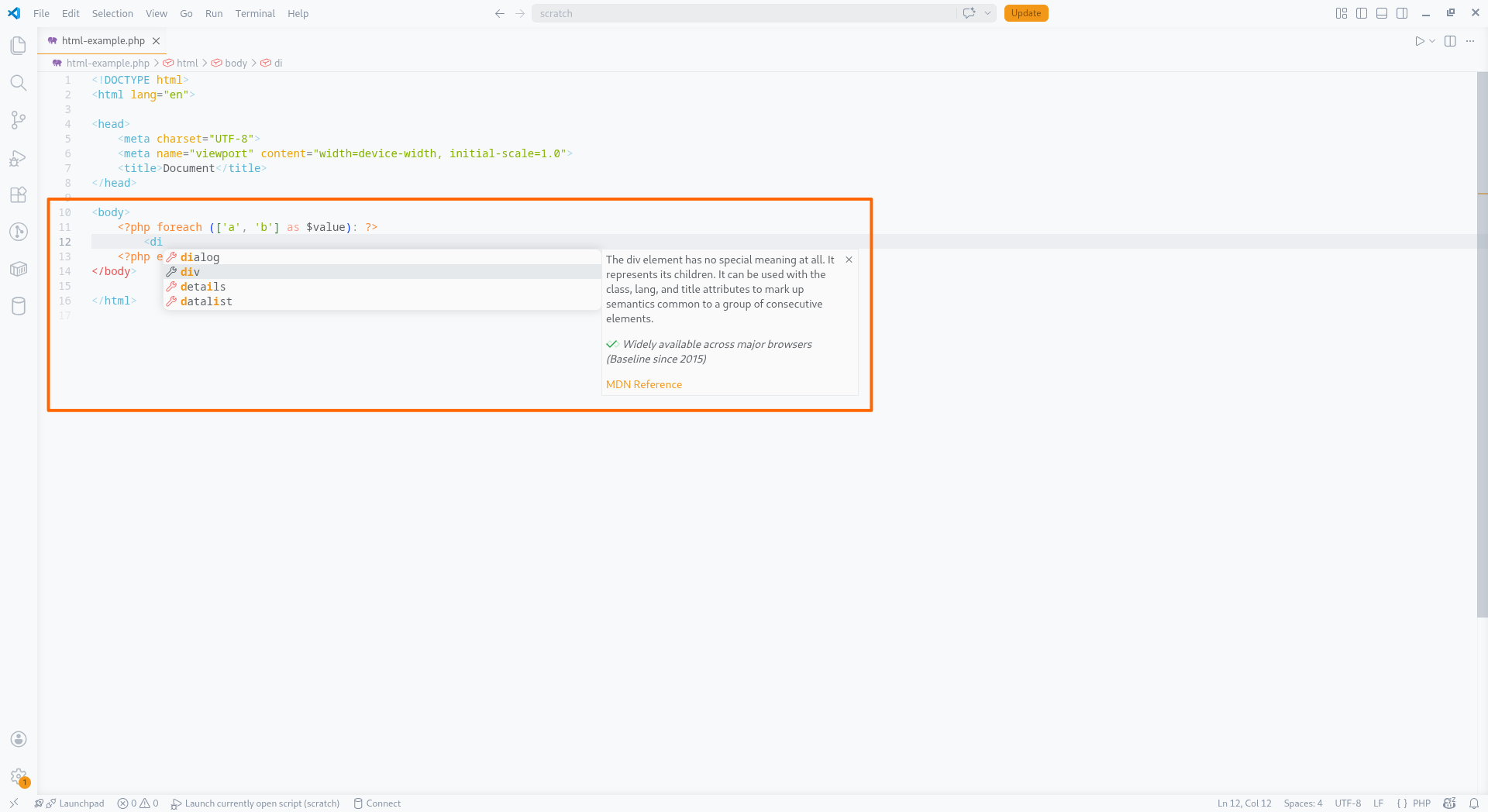
Intelephense presumes that text outside of PHP tags is HTML. Basic language intelligence is provided for HTML and embedded CSS and JavaScript within HTML.
Premium Features
The following features require a licence to access. A licence can be purchased at the checkout page.
Rename
This feature allows you to rename a symbol and all references to that symbol in the current file or workspace. This differs from a simple text find and replace in that it is aware of the syntax and semantics of the code, and will only rename the specific symbol.
Intelephense will prefer to limit renames to the current file if possible. For example, renaming a class reference in a file where the class has been imported with a use declaration will result in the references in that file only being renamed and the use declaration being updated with an alias. In such cases, to rename a symbol across the whole workspace, invoke the rename feature on the class declaration itself or the Fully Qualified Name (FQN) in the use declaration instead.
Renaming a namespace in a file updates imports and FQN references for the file symbols in that namespace through the workspace. If using PSR-4 style folder structures then renaming the namespace of a class is also the equivalent of a move class to file operation. Intelephense will return file rename instructions to the client in such cases.
Code Folding
This feature allows you to fold and unfold regions of code in the current file.
Intelephense provides folding ranges for symbol definition bodies, control structures, comments, imports, and custom regions identified by #region and #endregion comments.
The folding provider is syntax tree driven and is more reliable than indent based folding providers such as the default provider in VS Code.
Find All Implementations
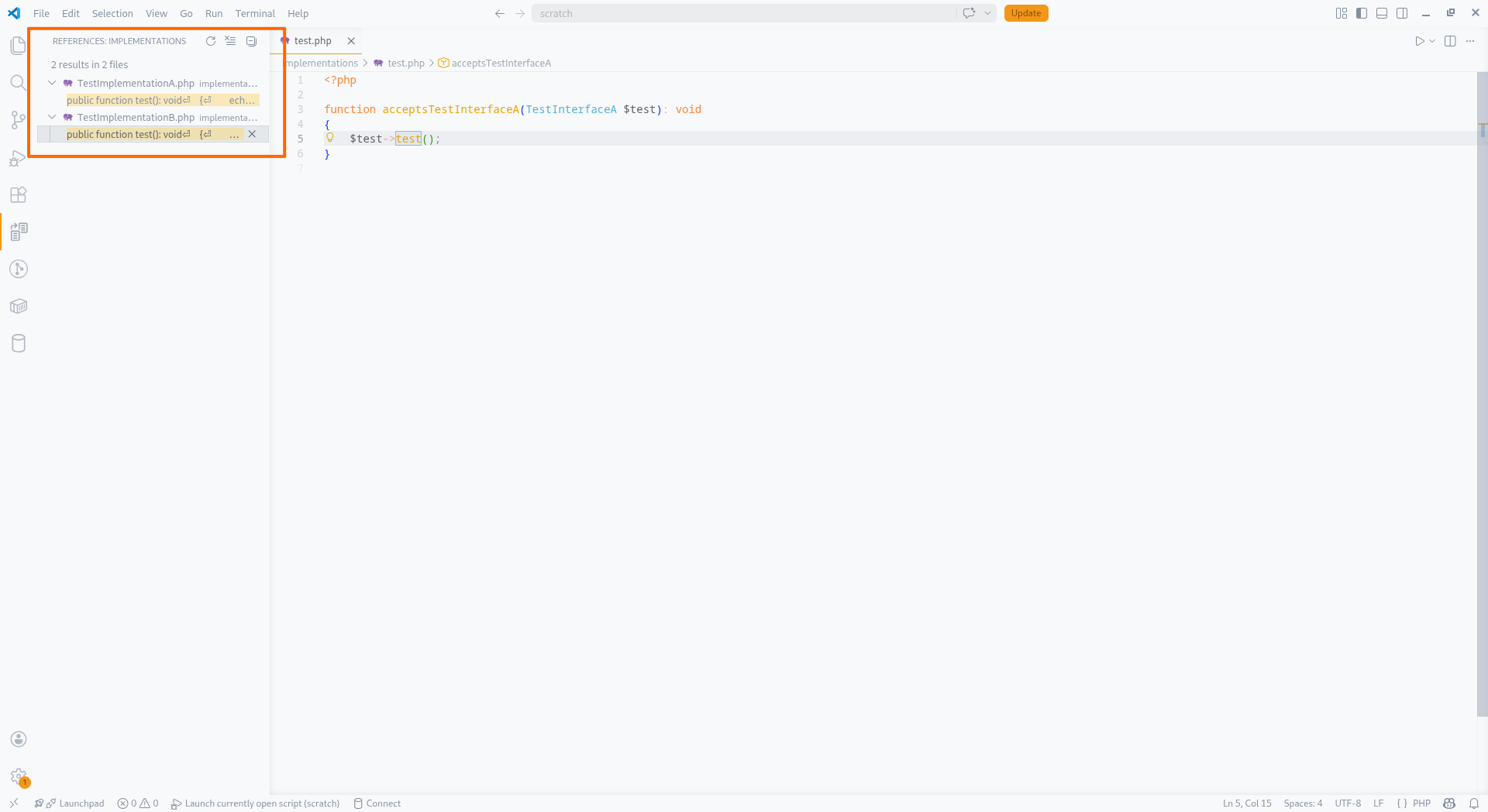
This feature provides a list of all implementations of a method or interface when invoked on a reference. This functions similar to go to definition but differs in that it will find the classes that implement the interface or methods that implement an abstract method declaration.
Go to Type Definition
This feature allows you to navigate to the type definition of a variable. Similar to go to definition but differs in that it will navigate to the type definition rather than the variable declaration itself.
Go to Declaration
This feature allows you to navigate to the initial declaration of a symbol. Similar to go to definition, and depending on the context may function the same, it differs in that it will navigate to the initial declaration of a symbol in a hierarchy of types. For example, invoking this feature on a sub-type method reference will navigate to the initial declaration of the method in a super-type rather than the sub-type method declaration itself.
Smart Select
This feature allows you to expand and shrink the current selection in the current file based on the syntax tree of the code. For example, if the cursor is on a variable name, the first expansion would select the variable name, the second expansion would select the whole variable declaration, the third expansion would select the whole statement, the fourth expansion would select the whole block, and so on. Being syntax tree driven, it is more precise than regex or indent based selection providers such as the default provider in VS Code.
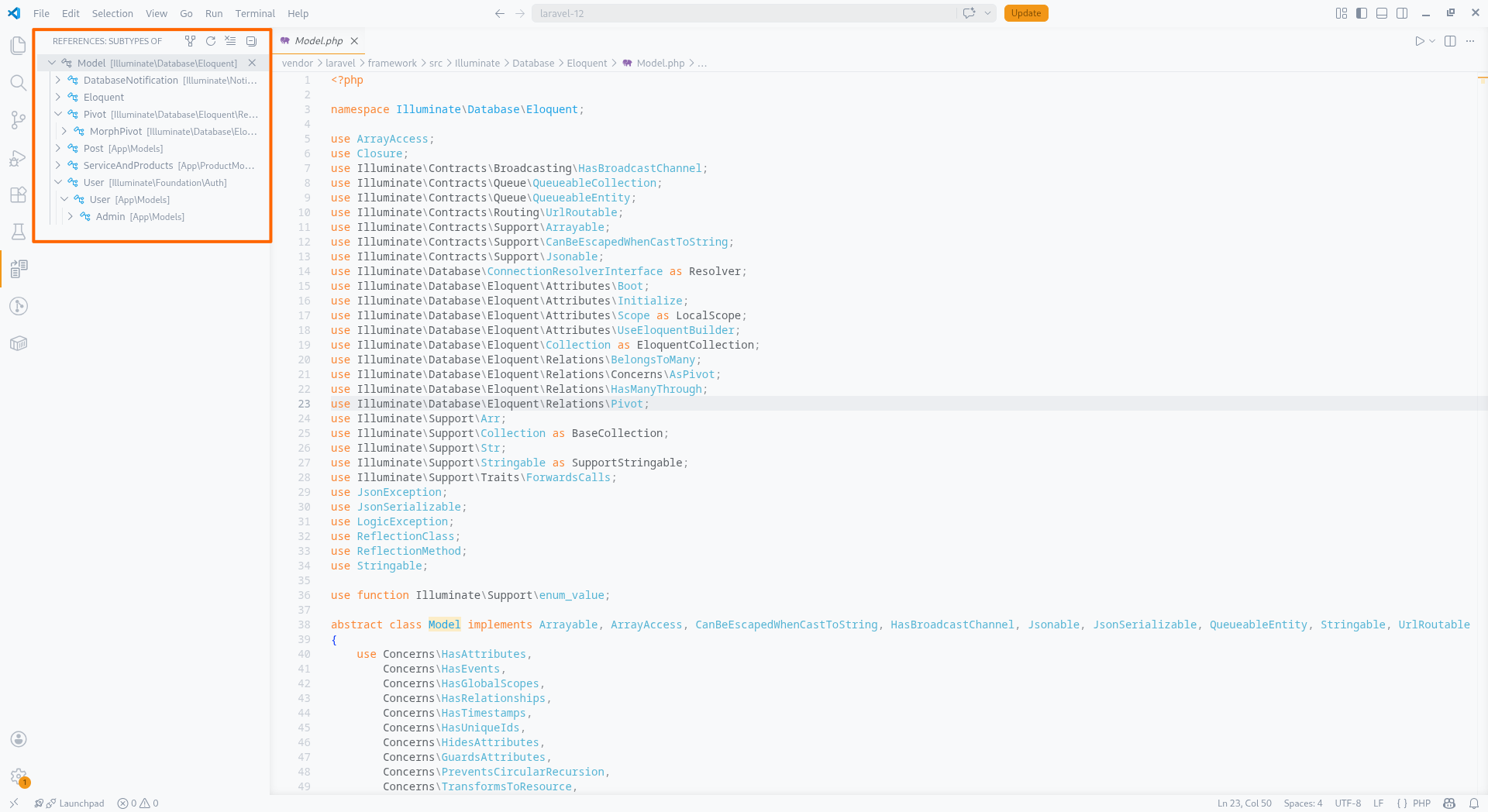
Type Hierarchy
This feature provides a type hierarchy for a class, interface, trait or enum when invoked on a reference to the type. It is useful for understanding the inheritance structure of a type and for quick navigation to types in the hierarchy.
Code Lens
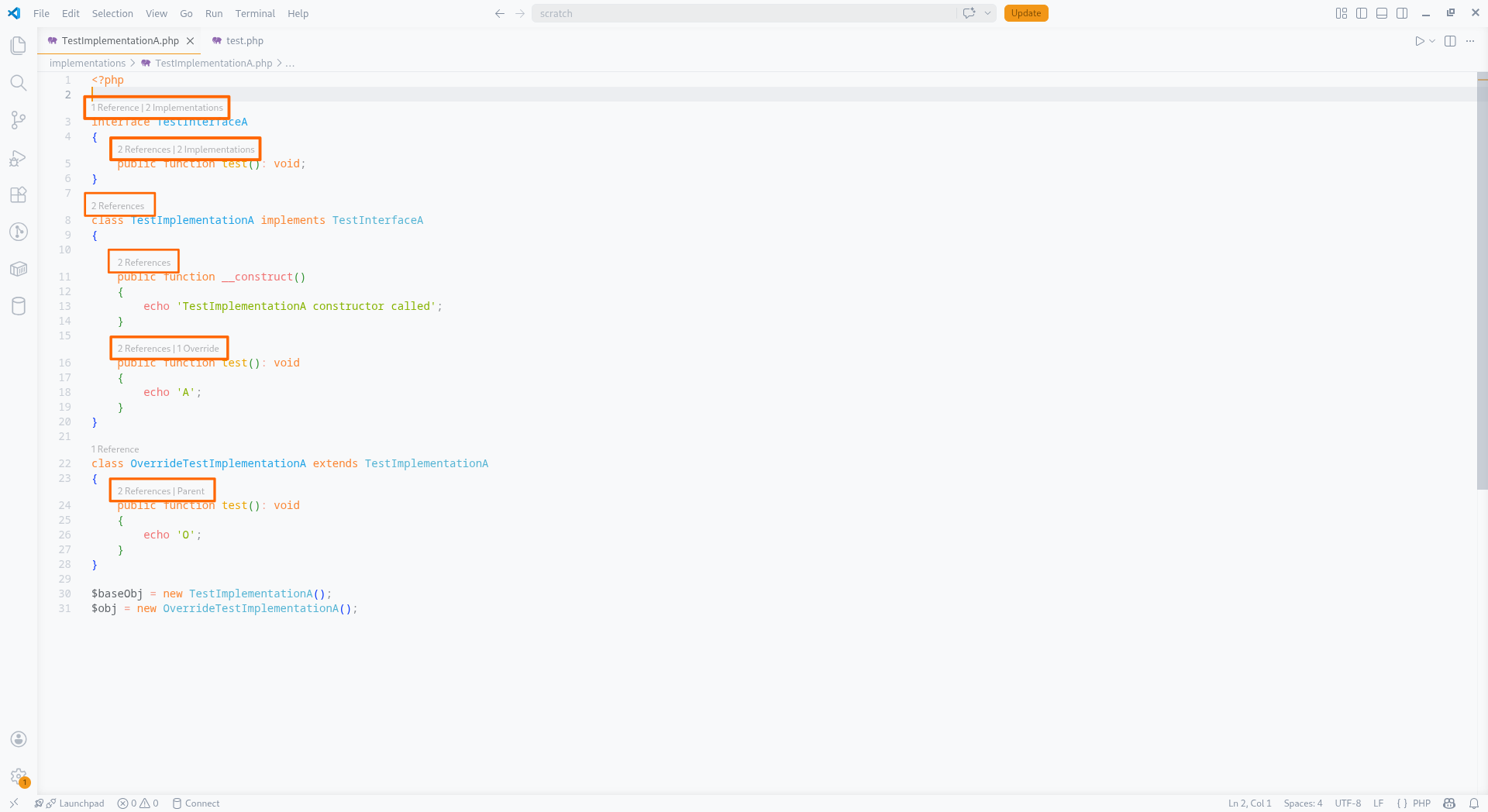
This feature provides additional information and navigation for symbol declarations in the current file.
Several lenses are provided by Intelephense. They are disabled by default to reduce visual clutter, see the intelephense.codeLens settings to enable them.
- References: shows the number of references to a symbol in the workspace and provides a link to view those references.
- Implementations: shows the number of implementations of an interface or abstract method and provides a link to view those implementations.
- Overrides: shows the number of overrides of a method in a type hierarchy and provides a link to view those overrides.
- Parent: shows whether a method overrides a parent method and provides a link to view the parent method.
- Usages: shows the number of types that
usea trait and provides a link to view those usages.
Inlay Hints
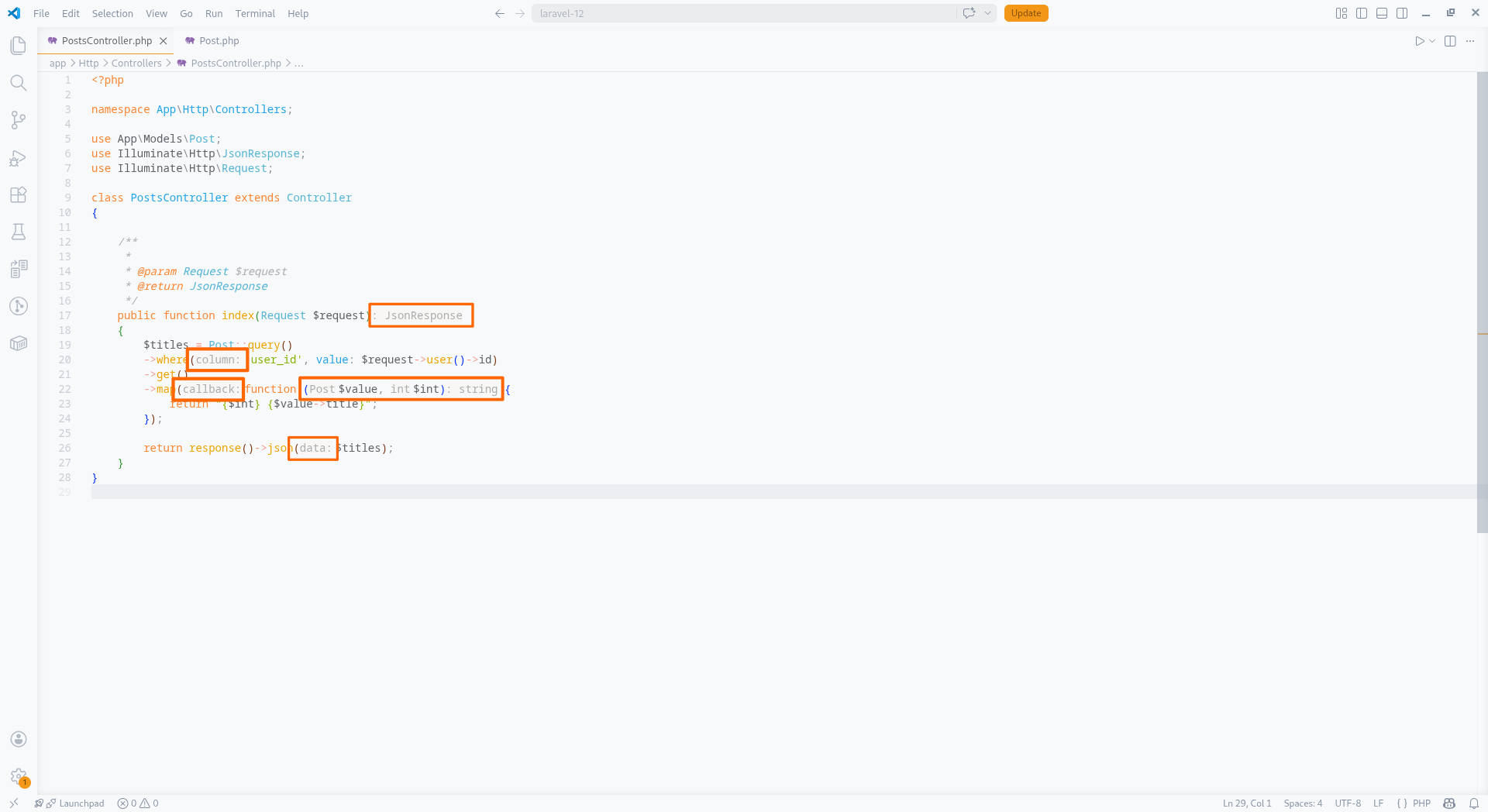
This feature provides additional type and parameter information in the form of hints that are displayed inline with the code in the current file.
Intelephense provides several types of inlay hints. They are enabled by default. See the intelephense.inlayHints settings to configure them.
- Parameter Name: shows the name of a parameter for a function or method argument.
- Parameter Type: shows the inferred type of a parameter in a closure that is an argument to another function or method when it has not been explicitly declared.
- Return Type: shows the inferred return type of a function or method when it has not been explicitly declared.
Document Links
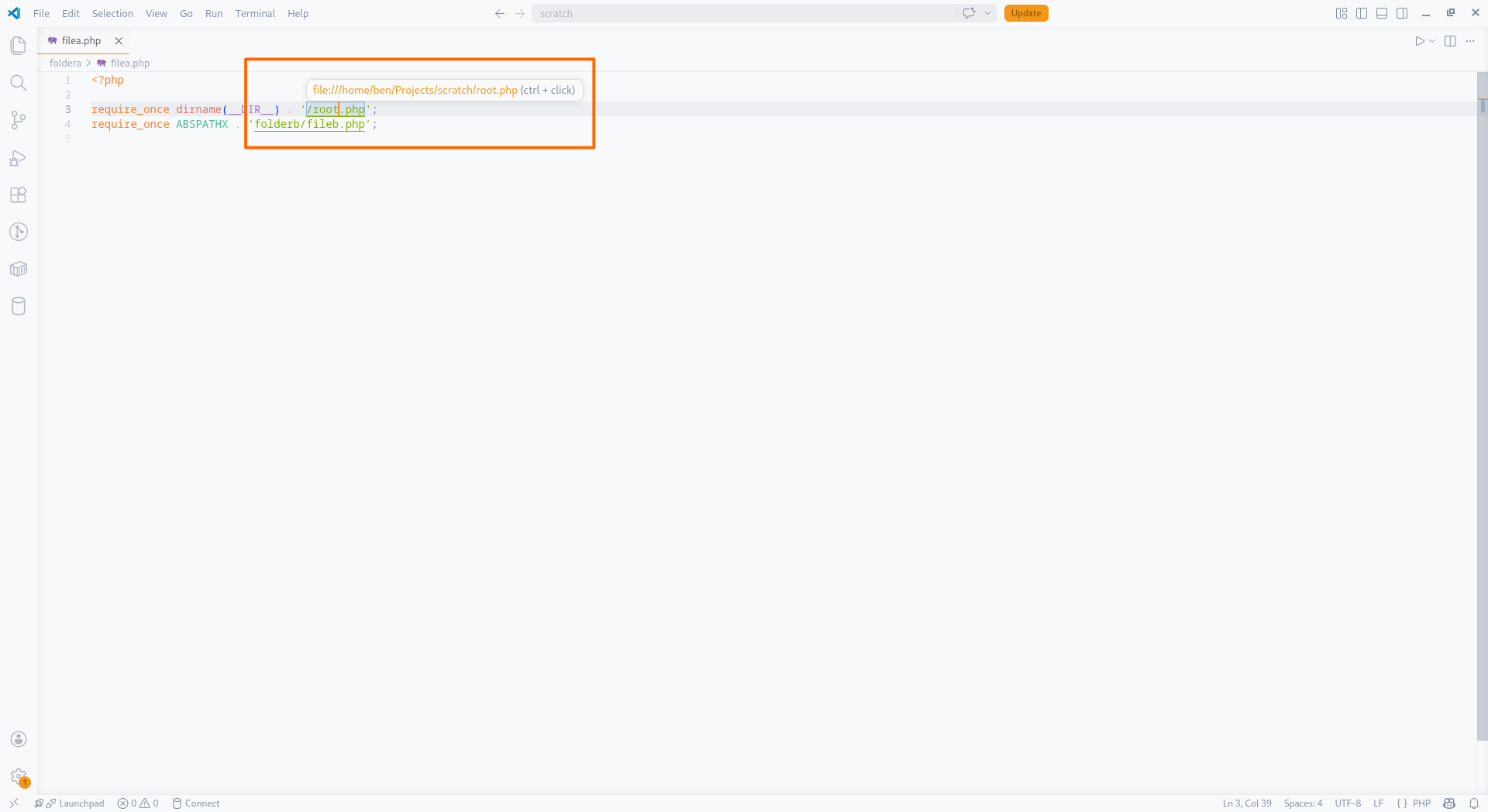
This feature provides clickable links to related files and resources from the current file.
Intelephense will show links to files referenced in require and include statements,
and to local files referenced in @see annotations.
If your require statements are relative or you reference $_SERVER['DOCUMENT_ROOT'],
you may need to configure the intelephense.environment.documentRoot setting to the correct path for the links to work.
Intelephense will fallback to the workspace folder path if this setting has no value.
Code Actions
This feature provides a list of context appropriate actions that can be performed at the cursor position in the current file. VS Code will show a lightbulb icon on the current line when code actions are available. Intelephense provides several code actions.
- Import Symbol: Import (
use) a type, function or constant to resolve an undefined symbol error. - Add PHPDoc: Generate PHPDoc for functions, classes, and methods.
- Implement All Abstract Methods: Generate method stubs for all abstract methods that have not been implemented in a class.
Appendix
Compatibility With Frameworks and Libraries
Intelephense aims to support all PHP frameworks and libraries but does not implement specific solutions for these. Limited or unexpected language intelligence can sometimes be provided if the package:
- Declares symbols at runtime via bootstrapping code or configuration.
- Uses interfaces heavily but encourages calling methods only declared on implementations.
-
Uses
__get,__call, or__callStaticmagic heavily without corresponding@propertyor@methodannotations. - Has insufficient or incorrect type declarations/annotations.
In such cases you may notice a lack of completion suggestions, trouble jumping to definitions or undefined symbol diagnostics may appear even though the code may work when executed.
For example, a common problem can be when a framework returns an interface from a function but the project has been bootstrapped to use a particular concrete type that has additional methods not declared on the interface.
<?php

interface View {}

class CustomView implements View
{
  public function customViewMethod() {}
}

function view(): View
{
  //some code that happens to return CustomView at runtime based on some bootstrapping code or config
}

view()->customViewMethod(); //undefined method 😭
There are several ways to workaround the problem above. These workarounds can fall into two categories. Either they become part of the project executable code itself, or they are declared in a non-executable helper file and are there only to override the default Intelephense behaviour.
Solutions that form part of the executable code
The advantage here is that problems in the code would become more apparent if the bootstrapping logic ever changed and returned a different class. The disadvantage is it is more code to write and perhaps difficult to retrofit to existing code.
<?php

//Assign the return value to a variable and narrow the type
$view = view();
if (! $view instanceof CustomView) {
  throw new Exception('Unexpected View instance');
}
$view->customViewMethod();

//Or with an annotation.
//This won't alter the execution of the code but still involves modifying the executable code.

/** @var CustomView $view */
$view = view();
$view->customViewMethod();

//A custom function could also be created and called instead to narrow the type
function customView(): CustomView
{
  $view = view();
  assert($view instanceof CustomView);
  return $view;
}

customView()->customViewMethod();
Solutions that do not form part of the project executable code
This involves creating a file with alternate symbol declarations and placing
it in your workspace folder (not in vendor).
Intelephense will prioritise user declared symbols over vendor declared symbols.
The advantage here is that it can be retrofitted easily to existing code, applies to all usages of the symbol and executable code remains untouched. The disadvantage is that it could suppress an actual error that Intelephense would otherwise detect.
<?php
// Create a file and add it to your workspace.
// eg intelephense_helper.php

// Declare a different signature for the view function.
// One that declares the concrete return type.
function view(): CustomView {}

// Or add the undefined method to the interface instead.
interface View
{
  function customViewMethod();
}
If classes, interfaces, traits, or enums have override definitions then
Intelephense will treat them as partial types and merge them with the vendor declared types.
Type overrides should either not use extends or implements clauses, or,
alternatively keep them the same as the real type because
implements and extends values are not merged.
There are also packages that provide or generate IDE helper files that may improve the experience when using various frameworks and libraries. For example:
PHPDoc Instead of PHPStorm Metadata/Attributes
PHPStorm provides a way to override or express types using metadata and custom attributes in order to provide better language intelligence for code that is difficult to analyse statically, and to address limitations in the PHP language.
The same can be achieved with PHPDoc types. For greater compatibility with Intelephense and other PHP static analysis tools such as Psalm and PHPStan it is recommended to use PHPDoc types instead of PHPStorm metadata and attributes.
Intelephense does not support PHPStorm attributes and provides only limited support for PHPStorm metadata. Support for PHPStorm metadata may be removed in future versions of Intelephense.
The following examples show how to express types using PHPDoc types instead of PHPStorm metadata and attributes.
<?php

class RedService {}
class BlueObject {}
class GreenCollection {}

// ----------------------------------------------------------------------------------------------
// Problem:
// A function accepts string|object and returns this type after performing some operation.
// We want to return a string if a string is passed or a specific object if an object is passed,
// not a string|object.

// Using PHPStorm metadata:
function paintColourMeta(string|object $input): string|object {}

PHPSTORM_METADATA\override(paintColourMeta(), PHPSTORM_METADATA\type(0));

// Using PHPDoc annotations:

/**
 * @template T of string|object
 * @param T $input
 * @return T
 */
function paintColourDoc(string|object $input): string|object {}
$result = paintColourDoc(new BlueObject); // $result is inferred as BlueObject

// ----------------------------------------------------------------------------------------------
// Problem:
// A function accepts a string and returns a different type based on the string passed in.
// We want to return a specific type based on the string argument, not a union of all possible return types.

// Using PHPStorm metadata:
function getColourMeta(string $value): mixed {}

PHPSTORM_META\override(getColourMeta(), PHPSTORM_META\map([
    'red' => RedService::class,
    'blue' => BlueObject::class,
    'green' => GreenCollection::class,
]));

// Using PHPDoc annotations:

/**
 * @template T of array{red: RedService, blue: BlueObject, green: GreenCollection}
 * @template K of key-of<T>
 * @param K $value
 * @return T[K]
 */
function getColourDoc(string $value): mixed {}
$obj = getColourDoc('red'); // $obj is inferred as RedService

// ----------------------------------------------------------------------------------------------
// Problem:
// A function returns an array with a specific set of string keys.
// We want to provide language intelligence based on the keys and value types of the returned array.

// Using PHPStorm attributes:

#[\JetBrains\PhpStorm\ArrayShape(['red' => RedService::class, 'blue' => BlueObject::class, 'green' => GreenCollection::class])]
function getColoursAttr(): array {}

// Using PHPDoc annotations:

/**
 * @return array{red: RedService, blue: BlueObject, green: GreenCollection}
 */
function getColoursDoc(): array {}
$green = getColoursDoc()['green']; // $green is inferred as GreenCollection

// ----------------------------------------------------------------------------------------------
// Problem:
// A function accepts a specific set of string literals as arguments.
// We want to provide language intelligence based on the allowed string literals

// Using PHPStorm attributes:

#[\JetBrains\PhpStorm\ExpectedValues(values: ['red', 'blue', 'green'])]
function setColourAttr(string $colour): void {}

// Using PHPDoc annotations:

/**
 * @param 'red'|'blue'|'green' $colour
 * @return void
 */
function setColourDoc(string $colour): void {}
setColourDoc(''); // Completion suggestions for 'red', 'blue', 'green'